This project focused on designing and managing the development of an AI-powered study tool for electrical apprentices in British Columbia, with a specific emphasis on neurodiverse learners. As Product Owner, Project Manager, and Lead Product Designer, I led the project end-to-end—from defining the problem and scoping the MVP to guiding research, design decisions, and implementation strategy.
The goal was to help apprentices simplify their own study materials without sacrificing accuracy. Unlike general AI summarization tools, this product sandboxed the Canadian Electrical Code to ensure reliable outputs for regulated trade content, reducing both cognitive overload and trust issues during studying.
Insights
National apprenticeship data reveals low retention and completion in skilled trades: only about 19–20% of apprentices in Canada complete their programs within the expected timeframe, and up to 40–44% discontinue training within six years of registration.
Research and Discovery
Approach
As Product Owner, I defined the research direction and ensured findings directly informed product decisions. Research combined qualitative and quantitative methods:
Interviews with trade workers and electrical apprentices
A user survey on study habits, pain points, and existing tools
Heuristic analysis of existing AI study tools and educational platforms
I intentionally scoped the project to one trade—electrical—to ensure accuracy, depth, and relevance before considering expansion to other trades.
Interviews
Interviewing a BCIT Master Electrician Instructor and electrical apprentices gave us direct insight into how learners navigate dense code material and where they need support. These conversations grounded our design decisions in real study behaviors and pain points.
Key concerns from survey
High presence of ADHD and autism among trade students
Dense, theory-heavy Level 1 content contributes to early retention issues
Manuals and code books are heavy in jargon and emotionally disengaging
Terminology in manuals often does not match how concepts are taught or practiced
Jargon and terminology inconsistency are major barriers
Misinformation from online sources (YouTube, forums) creates risk and confusion
Possible solutions from survey
Glossary & vocabulary tab: reduce jargon and acronym overload
Simplified summaries: grounded in a sandboxed code source
Visuals and examples: support for non-text learning preferences
User Survey
We conducted surveys with electrical apprentices to understand their study habits, main struggles, and the tools they use. Common difficulties included not knowing where to start, organizing information across sources, and learning from dense, jargon-filled textbooks—all of which contributed to cognitive overload.
These insights confirmed the need for a tool that helps apprentices simplify and structure their notes while maintaining accuracy.
Key concerns from survey
Difficulty learning from dense textbooks filled with jargon and acronyms
Large blocks of small text make it hard to focus and identify key information
Math and the Canadian Electrical Code are the most overwhelming subjects
Uncertainty about where to start when studying
Struggles organizing notes across manuals, worksheets, and PDFs
Many learners (6/8) reported ADHD, dyslexia, or other learning challenges
Possible solutions from survey
AI-Powered Summaries: Converts user notes and Canadian Electrical Code content into smaller, structured sections
Mind Map Generation: Transforms content into visual overviews to support conceptual understanding
Personalized Study Guide: Helps students know where to start by breaking content into clear, digestible sections
Accessibility Controls: Adjustable text size, contrast, and dyslexia-friendly options
Integrated Pomodoro Timer: Encourages focused, distraction-free study sessions
Competitive Analysis
We analyzed 7 direct and indirect competitors, including AI summarization tools and trade-focused study resources, to understand their strengths, weaknesses, and target users.
Many AI tools could summarize information, but they were not built for neurodiverse learners. Their interfaces were often complex, and their outputs were not always reliable. On the other hand, trade study resources provided accurate information but lacked tools to simplify dense code material.
Two clear gaps emerged:
AI tools lacked accuracy and trust for regulated trade content.
Trade resources lacked structured support for breaking down complex information.
User Personas
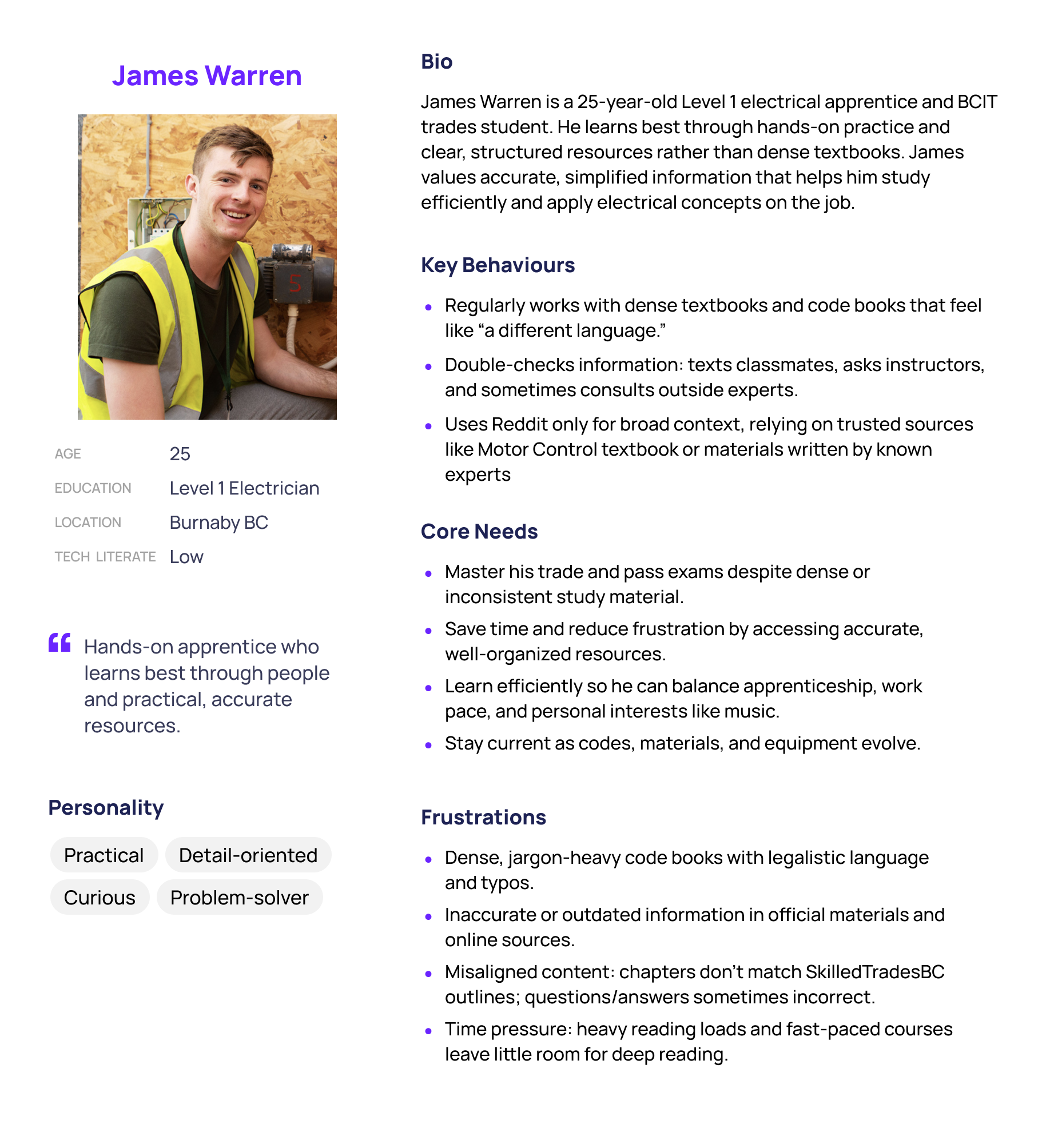
Primary
Persona image
Demographics, goals, and pain points will go here.
Secondary
Casey Bourne, Level 2 Electrician. Demographics, goals, and pain points in card above.
Using insights from the competitive analysis, interviews, and survey, two primary personas were developed to represent Got It's target audience, ensuring the team addresses their specific needs and challenges.
Key Findings
Learning & Cognitive Load
6/8 participants reported a learning disability (ADHD, dyslexia, or self-identified)
All participants with learning disabilities struggled with textbook-based learning
Learners take longer to study than peers and still feel unsure about the material
This leads to frustration, burnout, and demotivation
Studying & Organization
All participants feel unsure where to start when studying
Most struggle to organize information across manuals, worksheets, and notes
Dense content makes it hard to identify what is actually important
Content Challenges
Math and the Canadian Electrical Code are the most difficult topics
Large blocks of small text, jargon, acronyms, and technical language cause cognitive overload
Learners want visuals, examples, and simplified explanations
Existing Workarounds
Breaking down text manually
Highlighting and rewriting notes
Watching YouTube tutorials to understand concepts
Preference for hands-on, step-by-step, and visual learning
Design and Ideation
As Lead Product Designer, I translated research insights into a focused MVP. My core design principles were:
Reduce cognitive load at every step
Limit feature scope to avoid overwhelm
Prioritize clarity, structure, and predictability
Design for trust through transparent, verified data sources
Use a restrained visual system—no distracting colors unless they serve a clear functional purpose
The key product decision was allowing users to upload their own notes and generate simplified versions grounded in the Canadian Electrical Code.
4 key features to address user pain points (based on survey results)
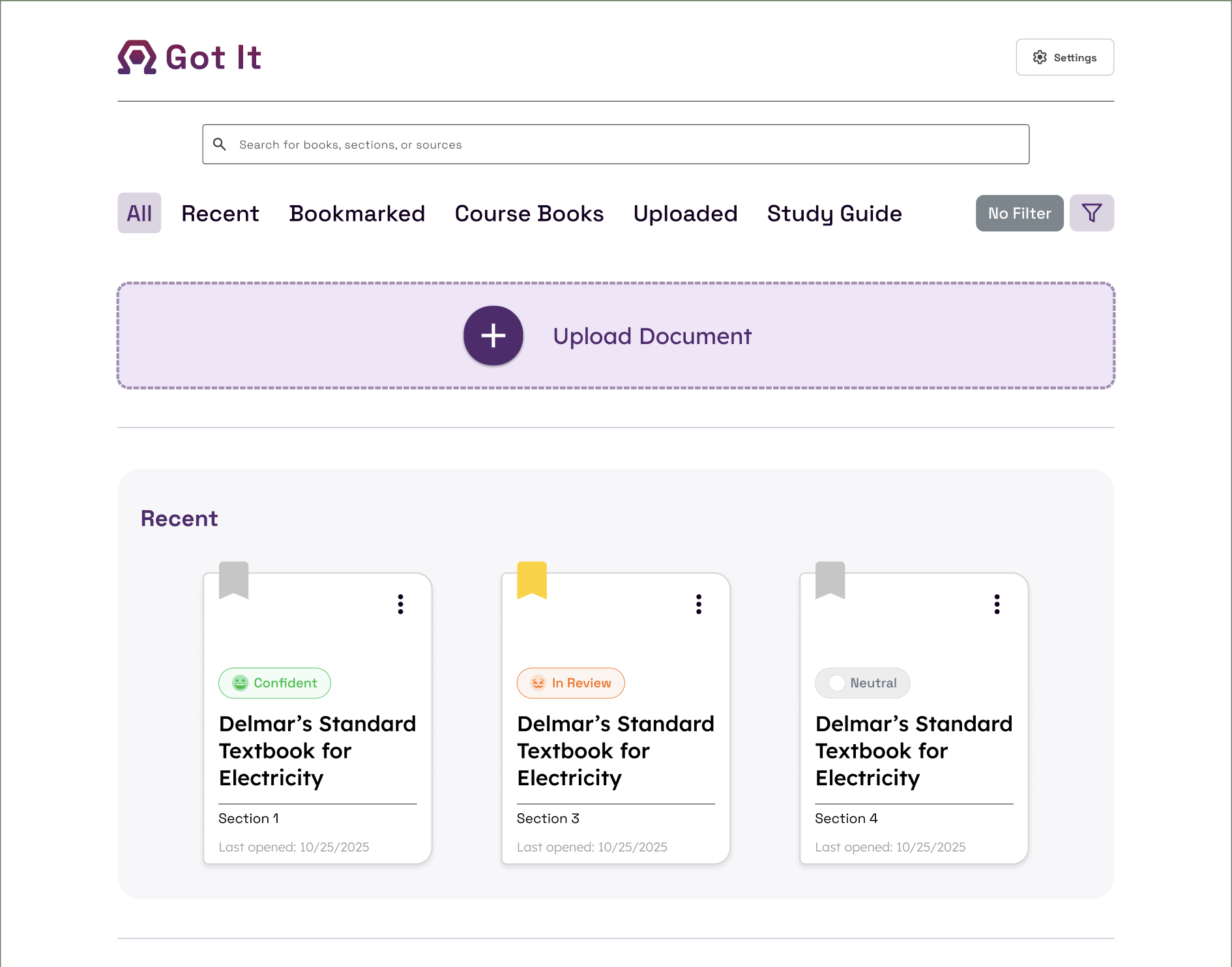
Upload or Select Material
Upload your own notes or pick a built-in textbook. Everything stays accurate because AI only uses the CEC.
Simplify or Summarize
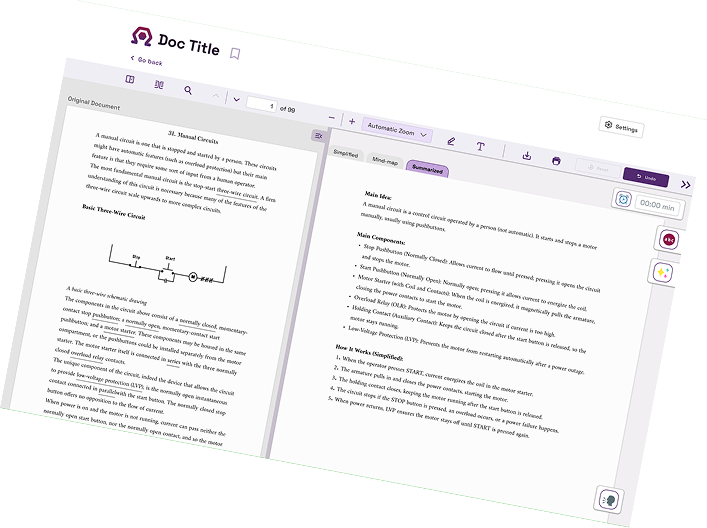
Turn dense text into easy-to-read versions or quick summaries.
Generate a Mind Map
See content visually and plan your study around your exam date.
Personalized Study Guide
Helps students know where to start by breaking content into clear, digestible sections.
Dual View
Compare original and simplified text side by side.
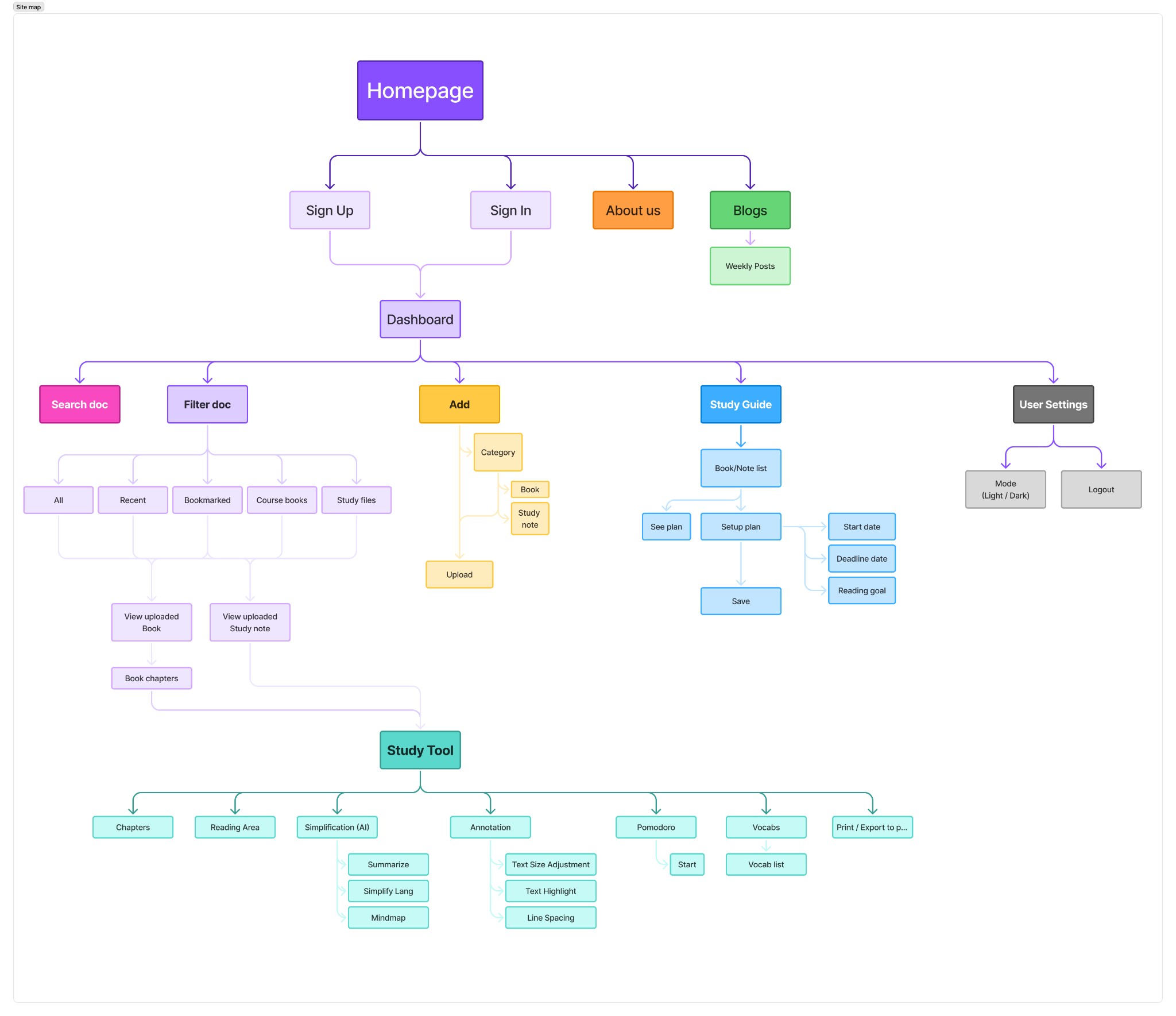
Site Map
The Site Map structured the website for clear navigation, enabling easy access to note uploads, simplified summaries, and side-by-side comparison. Since all surveyed apprentices study on laptops, we chose a web-based platform to match their workflow.
Visual Design & Style Guide
The visual system was intentionally minimal and calm, using:
Clear hierarchy and spacing
Limited color palette
Simple typography optimized for readability
Interfaces designed to feel supportive, not technical
The goal was to create an environment that felt safe, focused, and non-judgmental for learners who already feel overwhelmed.
Merch
Add merch images here
Final Product
Add final product visuals here
Reflection
As Co-Product Owner and Lead Product Designer, during the initial research and ideation phase, I felt overwhelmed by the number of issues uncovered through surveys, interviews, and competitor analysis. The problems were layered and systemic, and I questioned how we could realistically address them within a single product.
To regain focus, I prioritized the highest-impact challenges and defined clear scope boundaries. Instead of trying to solve everything, I focused on core features that directly reduced cognitive overload and improved study clarity. This iterative approach helped shape Got It into a focused, lean prototype grounded in real user needs.
Through this process, I learned how critical it is to separate important problems from urgent ones. As a leader, I had to make decisions that balanced ambition with feasibility, ensuring the team stayed aligned and confident in the direction. I also realized that designing within constraints doesn't limit creativity—it sharpens it. By narrowing the scope, we built something intentional rather than bloated.
Ultimately, I learned that strong scope definition, disciplined prioritization, and decisive leadership are just as important as creativity when building meaningful, user-centered products.